
Aerial Order Pickers for Warehouse Stocktaking: Planning High-Shelf Counts
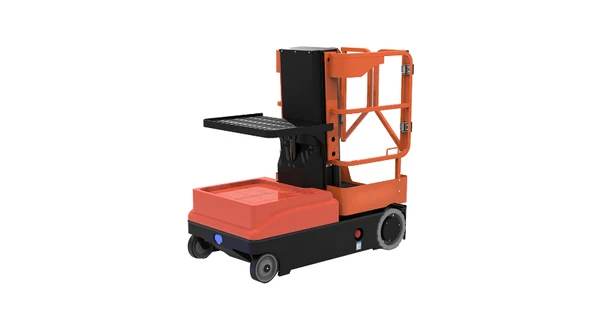
An aerial order picker gives warehouse staff a platform from which to count stock on upper shelves. It is useful where labels or container contents cannot be checked from the floor. Selecting one for a stocktake involves more than matching a catalogue height to the top shelf: the operator also needs room to see, scan and, where necessary, handle the goods.
The awkward locations deserve attention early. Open boxes, deep bins and stock tucked behind other containers can change what the counting team needs from the machine.
Decide What the Counter Needs to Verify
A row of visible cartons may be straightforward to count. A shelf containing open boxes, small parts and mixed pack sizes is a different job. The operator may need to read individual labels or handle a container before entering a quantity.
That distinction changes the access requirement. A location label facing the aisle may be readable from below. The contents behind it may not be. Buying a lift solely around label height can leave the more difficult part of the count unresolved.
Before comparing equipment, group the work into three practical situations:
| Shelf condition | What the count involves | What to check during equipment selection |
| Visible, clearly labelled cartons | Confirming the location and counting accessible units | Viewing position and scanner readability |
| Open bins or mixed packs | Checking item identity and the quantity inside | Comfortable access to the contents without leaning beyond the platform |
| Stock hidden behind other goods | Moving goods before a reliable count is possible | Whether a separate stock-handling step is needed |
The third situation deserves attention. More lift height will not make a blocked container visible. The warehouse may need to bring it to a suitable counting position through its normal handling process.
Match Platform Height to the Actual Shelf Task
For a side label, the operator needs a clear view across to the container. To count loose items inside, the view may need to be from above. The shelf has not changed height, but the position needed for the work has.
The JQLIFT OPC range offers two maximum platform heights: 3,000 mm on the OPC03M and 4,000 mm on the OPC04M. This is the height of the standing surface. Model selection still requires a check of the actual task from inside the platform, including the view into the container.
A demonstration with an empty rack will miss some of these difficulties. Leave representative containers on the shelves and check what remains out of view, especially behind the front row of stock.
The operator must remain within the permitted working position. Climbing or leaning over guardrails is not an option for finishing an awkward count; the access or handling arrangement has to change.
Give the Scanner and Counted Goods Their Own Space
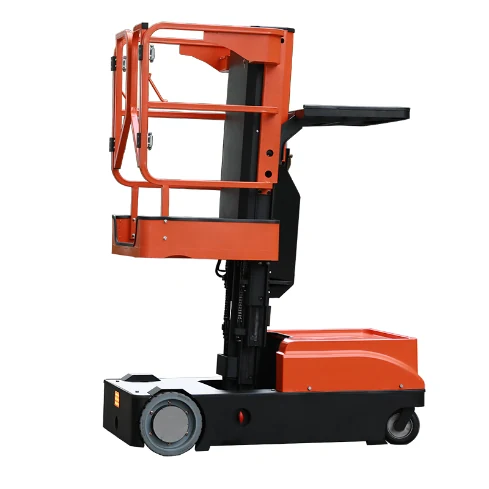
Consider where the scanner goes when both hands are needed for a container. Leaving it in the way of a control or across the access gate creates another problem. The same applies to stock put down temporarily during a check.
The OPC has separate areas for the operator and goods. Its catalogue lists a 136 kg platform capacity, a 90 kg cargo tray capacity and a 110 kg carry deck capacity. These are separate area ratings, not a single allowance that can be moved freely between them. The permitted load combination must follow the instructions for the supplied machine.
The load rating settles only part of this question. A carton can be within the tray rating yet still awkward to inspect because its sides block the view. For this reason, the sample used in a demonstration should resemble the cartons or bins used on the actual shelves.
Bring the normal scanner as well. A trial can reveal an awkward grip or a poor place to set it down before a holder is specified. Any added holder needs to suit the machine, with approval where required. Attaching one to a guardrail without checking is not a substitute.
Plan the Count Around Stops and Stock Movements
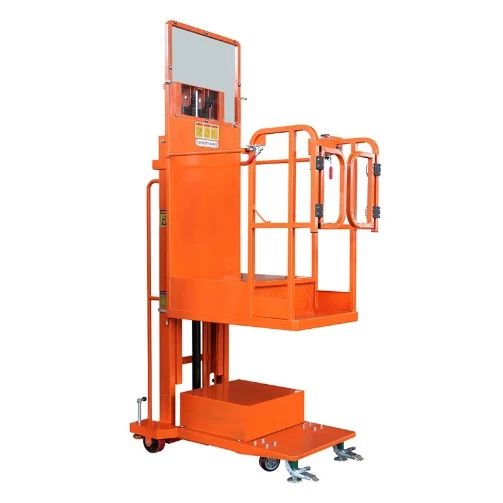
Counting a few problem locations is different from checking every upper shelf along an aisle. Some jobs involve long periods at one bay. Others require frequent repositioning between short checks.
JQLIFT offers both powered-travel equipment and manually moved equipment with electric lifting. Manual repositioning may suit a small group of locations checked occasionally. Repeated short counts along several aisles put more emphasis on moving the machine. Total stock lines are a poor guide to that effort. What matters is the route assigned to this equipment, including the returns to any locations that need checking again.
The operating instructions govern travel at height. A powered drive is not permission to reposition the machine with the platform raised under every condition.
Coordinate the Physical Count with the Warehouse Record
There is also a timing question. Suppose stock is picked from a location after the physical count but before that count is entered. Unless the movement is accounted for, the recorded quantity may already be out of date. The warehouse needs a procedure for that situation whether a lift is used or not.
The count record needs a location and a unit as well as a number. Cartons and loose pieces may need separate entries, depending on the warehouse system. Any difference from the stock record then goes through the agreed review procedure.
When a location needs another visit, note the reason. Was a label hidden, a quantity entered in the wrong unit, or stock moved during the count? Changing the access equipment would address only some of those problems.
Test a Short Route Before Choosing a Model
A few bays can provide enough variety for a first trial, provided they include the difficult approaches identified earlier. Use the normal scanner and containers. The site’s approved operating arrangements and trained personnel are required for the demonstration.
The trial record can stay simple:
- Can the operator see the location label and the stock being counted?
- Can the scanner and any sample container be used without obstructing the controls?
- Does the machine have room to approach, stop and leave each selected bay?
- Which locations need another handling method before they can be counted?
- How much time is spent repositioning, counting and dealing with exceptions?
Keep a note of unfinished counts alongside the timing results. An inaccessible bin is an unresolved part of the job, even if the rest of the route goes quickly.
FAQ
Does a stocktake require the same equipment as daily picking?
Sometimes an existing machine can cover both jobs. The check is whether it suits the counting locations and any containers that must be handled there. A machine used successfully on one picking route has not necessarily been assessed for every stock location.
Is powered travel necessary for an occasional stocktake?
Possibly, but the route is the deciding detail. Compare how often the machine must be moved and the effort involved. This applies to a one-off stocktake just as it does to recurring checks.
Discuss the Counting Task with JQLIFT
An enquiry to JQLIFT can start with shelf and label heights, shelf depth and the aisle layout. Add the container sizes and describe the counting route. Mention any locations where stock has to be opened or moved: those details help distinguish a simple viewing task from work that requires space for handling goods.


